





Introduction
This post has been about a year in the making. I started, stopped and started again, so what better time to finish it than a week before the MLB lockout is due to start.
I have been a baseball fan since my firstborn used to wake up at 3am every night without fail, and baseball was the only sport on at that hour. Somewhere along the way I decided I wanted to see a game at every one of the 30 MLB ballparks. Plenty of people have done it. Most of them kept a list.
A list would have been fine. A list does not need a CDN, an identity provider or an infrastructure pipeline. I built all three anyway. I wanted something to practise on that I would actually use.
So this is the 30 Ballpark Challenge.
What it does
- Dashboard. How many parks I have done, how many are left, and how I rated them.
- Map. All 30 parks. The ones I have visited stand out. The ones I have not are a reminder.
- Check in. Log a visit with the date, the opponent, the score, a rating, some notes and a photo.
- Gallery. One photo per park. It is a scrapbook, after all.
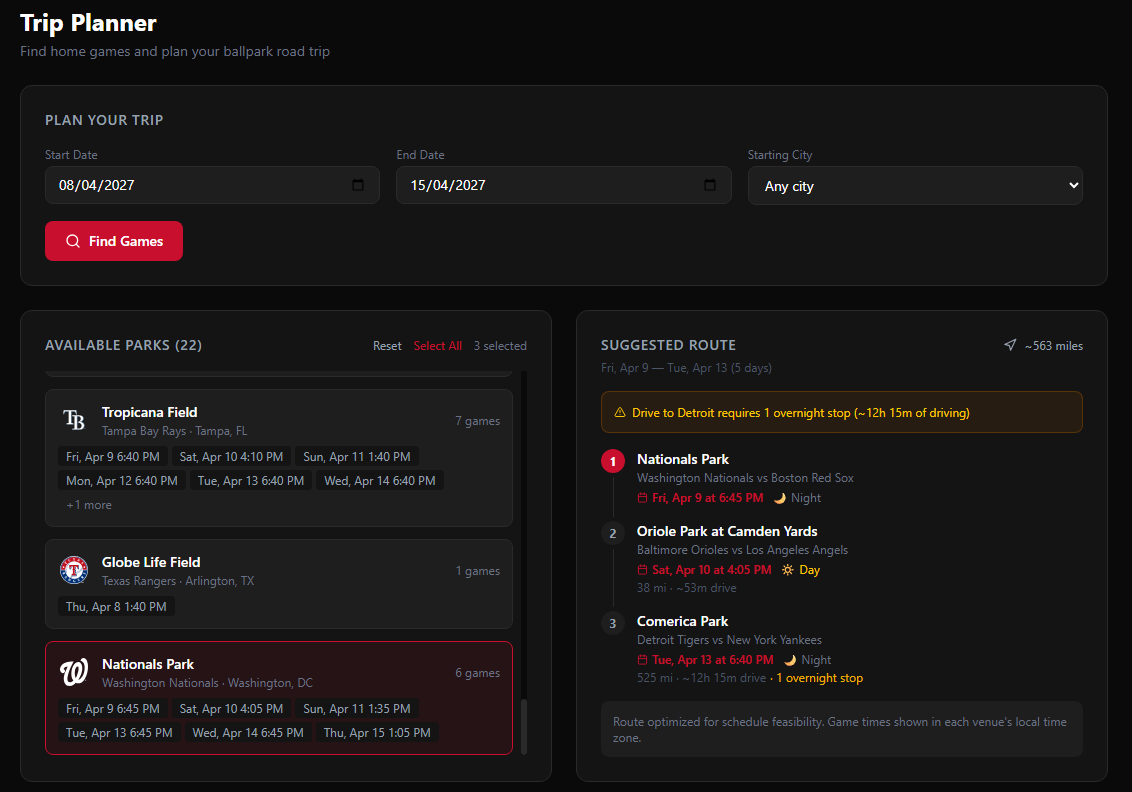
- Trip planner. Pick some parks and a date range, and it builds a road trip around real games.
The trip planner is the interesting bit
Everything else is CRUD with nicer CSS. The planner is where the actual problem is.
Getting between ballparks is easy. Getting there while a game is on is the hard part. Teams play at home for a few days, leave for a week, and come back. Two parks can be a three-hour drive apart, and if you get the order wrong you arrive the day after the series ends.
My first version did the obvious thing and went to the nearest park next. That breaks quickly. Going somewhere close first can mean you miss somewhere further away that only had one game you could get to. So the planner now keeps a handful of possible routes going at the same time and only drops the bad ones once it can see that they are bad. That costs a little more compute, but it stops the planner backing itself into a corner.
It also has some opinions about you as a driver:
- You only drive so many hours a day.
- You do not drive through the night.
- You arrive with enough time to find parking and buy a hot dog.
- If the game finishes late, you sleep before the next leg.
Parks it cannot fit in get flagged rather than quietly dropped.

Drive times come from the Google Maps Routes API, called from a Lambda. If Google is unavailable, or I have used up my quota for the day, the planner falls back to a straight-line distance with an allowance for the roads not being straight. That is how the planner worked before Google was involved. It is rougher, but it is good enough to plan with.
If you have read my other posts, you might expect an MCP server in there somewhere. There is not one. I used MCP servers constantly while building this, for Maps, for the AWS docs and for pulling the park data together at the start. But they are tools for the AI I was coding with. The app has no AI in it, so it calls the APIs directly. If there is no agent in the request path, there should be no MCP in it either. I might be convinced to add one at a later date!
The schedule comes from MLB’s stats API. It is public and it is free, which is my favourite kind of API.
The building blocks
I am keeping this high level, but here is roughly what it is made of:
- React for the front end.
- AWS Lambda for the API. A few small functions, each with one job and its own IAM role.
- Amazon DynamoDB for visits and trips. One table, everything partitioned by user.
- Amazon S3 for photos. Private, with versioning on, and uploads go straight from the browser using short-lived URLs.
- Amazon CloudFront in front of everything. It serves the site, sets the security headers, and is the only way in to the API.
- Amazon Cognito for sign in, with every request checked on the backend as well as the front.
- AWS Secrets Manager holds the Google Maps key.
- AWS CloudFormation for all of it, with separate dev and prod stacks.
- GitHub Actions for CI/CD, using OIDC so there are no long-lived AWS keys sitting anywhere. Dev deploys on push. Prod is ready for when I want it.
You might notice there is no API Gateway. CloudFront already handles HTTPS, caching and headers, so adding a second front door just for routing seemed pointless. Cutting it out meant locking the functions down myself so the only way to reach them is through CloudFront, but that turned out to be less work than it sounds.
What I learned
Free tiers have teeth. The planner wants drive times between every pair of parks. Thirty parks is 900 pairs. My daily quota on the Maps side was about one page load. Without caching, the app would have worked fine for exactly one visit a day and then fallen over. Park locations do not move, so the results are cached for a long time and the bill stays at zero.
So do your tests. The end-to-end tests run in Playwright, in a fresh browser with nothing cached. Left alone, every CI run would have burned through the whole quota before lunch. The tests now fake that call.
Read the limits first. Google caps how big a single drive-time request can be. I found out after deploying to dev, when the request was rejected and my own error handling turned it into an unhelpful 500 with no detail. Now the requests are split up and anything too big is rejected with an error that tells you what went wrong.
Timezones will humble you. A 7pm game in Chicago is not a 7pm game on my laptop. Every time the planner works out a drive or a start time, it uses the ballpark’s local time. That sounds obvious, and I still got it wrong the first time.
Wrapping up
I have been to 2 of the 30 so far. The app is built and the planner works. In a week there may be no games to plan around, which is good timing on my part.
Written by a human, made legible with AI.