


Introduction
If you are anything like me, you will leave everything to the last minute, or better yet, forget to do it altogether. I ran into this recently when I switched employers. My original employer was an AWS Partner, as was my new one. One thing they had in common was an AWS Partner Portal that I needed to grant permission to in order to load my AWS certifications. What I forgot to do was disassociate my personal AWS Skill Builder account from my previous employer’s corporate account.
The Issue
The issue itself wasn’t very clear at first. I created a new AWS Skill Builder account with my new corporate email address. But when I tried to add my personal email address to share certificates and badges, it failed silently. The only error message was “Failed to assign personal email address.”
After a bit of digging, I found that a personal account can only be linked to a single corporate entity. I concluded that my previous employer still hadn’t removed me from their portal, and set out to fix it.
The Challenge
I found countless re:Posts and Reddit threads that touched on my issue, but none were exactly my issue. Most were about pulling certificates from a corporate Skill Builder account into a personal one, which is the opposite problem. I quickly realised this wasn’t something I could resolve on my end.
The Solution
Navigate to the AWS support form here.
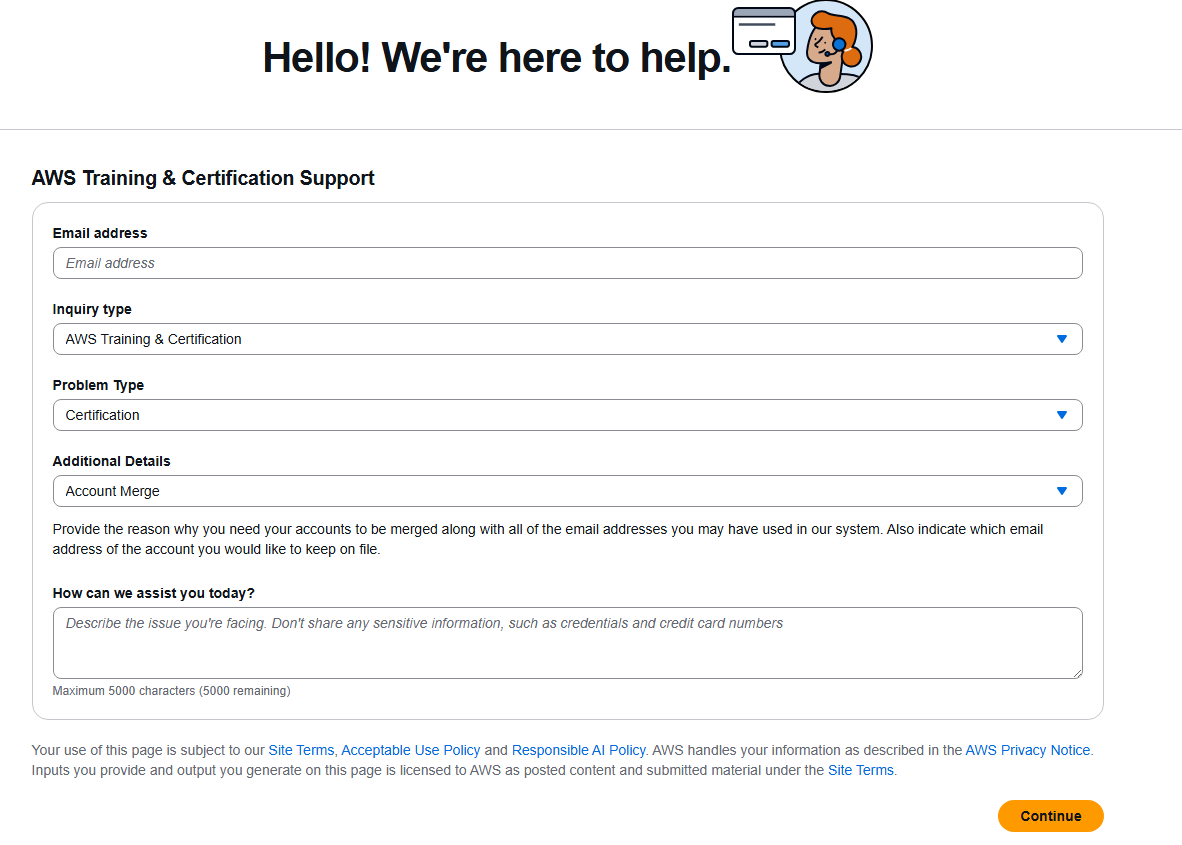

- Problem type: Certification
- Additional details: Account Merge
Provide as much detail as possible, including:
- Current employer email
- Previous employer email
- Personal email
- Personal Skill Builder notification email (this may be different from your personal email)
- CertMetrics identifier (found on one of your certificates)
AWS were very responsive and resolved the issue within 48 hours.
However, I was advised to allow 5-7 business days for changes to reflect in your new employers partner scorecard.